<?xml version="1.0" encoding="utf-8"?><feed xmlns="http://www.w3.org/2005/Atom" ><generator uri="https://jekyllrb.com/" version="3.10.0">Jekyll</generator><link href="https://muntasimulhaque.github.io/feed.xml" rel="self" type="application/atom+xml" /><link href="https://muntasimulhaque.github.io/" rel="alternate" type="text/html" /><updated>2026-07-08T00:02:13+06:00</updated><id>https://muntasimulhaque.github.io/feed.xml</id><title type="html">Muntasim Ul Haque</title><subtitle>Personal site of Muntasim Ul Haque - Telecommunications professional specializing in submarine cable infrastructure</subtitle><author><name>Muntasim Ul Haque</name></author><entry><title type="html">Write Bangla on Debian/Devuan/Ubuntu/Mint Xfce</title><link href="https://muntasimulhaque.github.io/write-bangla-debian-xfce/" rel="alternate" type="text/html" title="Write Bangla on Debian/Devuan/Ubuntu/Mint Xfce" /><published>2025-08-14T00:00:00+06:00</published><updated>2025-08-14T00:00:00+06:00</updated><id>https://muntasimulhaque.github.io/write-bangla-debian-xfce</id><content type="html" xml:base="https://muntasimulhaque.github.io/write-bangla-debian-xfce/"><![CDATA[<p>You can write Bangla on Debian or Debian based distros, e.g. Devuan, Ubuntu, Mint, etc., Xfce edition using the IBus input method.</p>

<p>For this, you need to install some packages using the following command:</p>

<div class="language-plaintext highlighter-rouge"><div class="highlight"><pre class="highlight"><code>sudo apt install ibus ibus-m17n m17n-db ibus-gtk
</code></pre></div></div>

<p>This would install the required packages for writing Bangla on any Debian or Debian-based system.</p>

<p>Now you have to add the IBus daemon into the startup items so that IBus autostarts with the desktop.</p>

<p>On the Xfce desktop, open the <strong>Session and Startup</strong> application from the Applications Menu. Then go to the <strong>Application Autostart</strong> tab and click on the <strong>Add</strong> button from the lower left.</p>

<p>Add the following info into the dialog prompt:</p>

<div class="language-plaintext highlighter-rouge"><div class="highlight"><pre class="highlight"><code>Name: IBus daemon
Description: Start the IBus daemon when Xfce starts
Command: /usr/bin/ibus-daemon -d
</code></pre></div></div>

<p>You can write anything into the <strong>Name</strong> and <strong>Description</strong> text boxes. But the <strong>Command</strong> has to be exactly as I put in here and the rests don’t matter.</p>

<p>Then click on the <strong>OK</strong> button to save it and then close the Session and Startup application.</p>

<p>Now all you have got to do is reboot the system.</p>

<p>After a reboot, you should see the IBus input method icon on the Xfce panel. Right-click on it and select <strong>Preferences</strong>. This would open the IBus Preferences.</p>

<p>Now go to the <strong>Input Method</strong> tab and click on the <strong>Add</strong> button.</p>

<p>Click on the more button and scroll-down until you see Bengali. Click on it and select <strong>unijoy (m17n)</strong> from there. This would add the unijoy keyboard layout into IBus input method.</p>

<p>I like unijoy for I’m used to the Bijoy keyboard layout and this unijoy keyboard is similar to Bijoy.</p>

<p>You can choose other keyboard layout to your liking from the list.</p>

<p>Now go to the <strong>General</strong> tab of IBus Preferences and click on the 3-dot button of the Next input method. Uncheck <strong>Super</strong> key from Modifiers and check the <strong>Control</strong> key instead. And then click on the Apply button. Then click on the OK button and finally close the IBus Preferences.</p>

<p>This changes the keyboard toggle shortcut for switching Engish keyboard and Bangla unijoy keyboard with <code class="language-plaintext highlighter-rouge">Ctrl+Space</code>. That means whenever you press <strong>Ctrl</strong> and <strong>Space</strong> keys together, it toggles between English and Bangla keyboard.</p>

<p>Alternatively, you can just select the desired input method from the IBus input method icon in the Xfce panel to chnage the keyboard layout.</p>

<p>For me though, I just prefer the keyboard shortcut as I don’t have to lift my hand from the keyboard.</p>

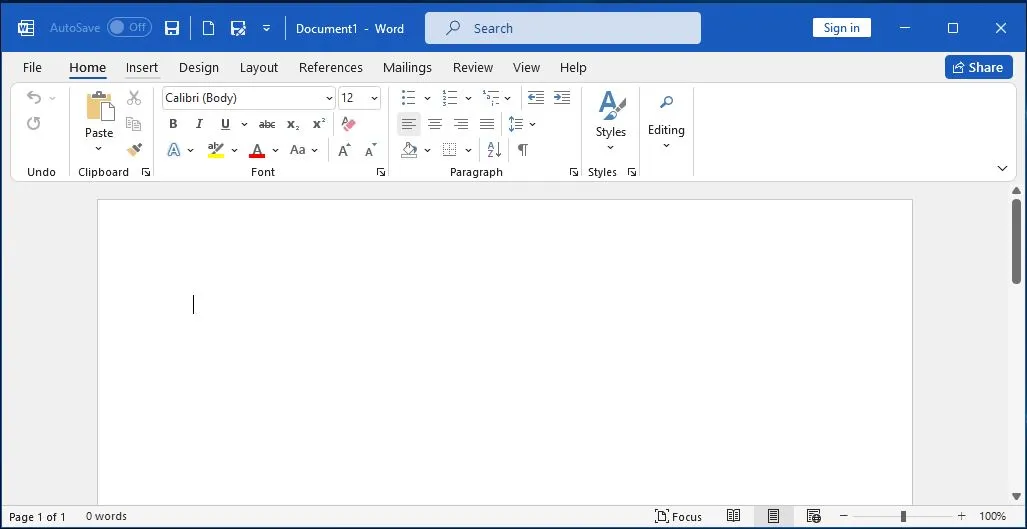
<p>Hope this helps.</p>]]></content><author><name>Muntasim Ul Haque</name></author><summary type="html"><![CDATA[You can write Bangla on Debian or Debian based distros, e.g. Devuan, Ubuntu, Mint, etc., Xfce edition using the IBus input method.]]></summary></entry><entry><title type="html">Microsoft Office 365 Thick Window Title Bar Issue</title><link href="https://muntasimulhaque.github.io/thick-titlebar-office-applications/" rel="alternate" type="text/html" title="Microsoft Office 365 Thick Window Title Bar Issue" /><published>2025-08-09T00:00:00+06:00</published><updated>2025-08-09T00:00:00+06:00</updated><id>https://muntasimulhaque.github.io/thick-titlebar-office-applications</id><content type="html" xml:base="https://muntasimulhaque.github.io/thick-titlebar-office-applications/"><![CDATA[<p>My Microsoft Office 365 suit of applications, e.g. Word, Excel, PowerPoint, etc. show a thick title bar, which is outrageous to say the least. Take a look at the screenshot below.</p>

<p><img src="/assets/images/2025-08-09-thick-titlebar-office-applications/microsoft-office-thick-title-bar.webp" alt="Thick Window Title Bar in Microsoft Office 365" title="Thick Window Title Bar in Microsoft Office 365" /></p>

<p>It’s hideous. Looks aweful.</p>

<p>I tried many things and at last found a solution in the <a href="https://techcommunity.microsoft.com/discussions/microsoft-365/thick-window-title-bar-in-office-365-applications/2980542/replies/4158320" target="_blank">Microsoft Tech Community website</a>, posted by a user named <strong>Rashid_Mehmood</strong>. This worked for me.</p>

<p>It’s a registry hack. Just copy the code below in a text editor, maybe use the default windows notepad, and save it as <code class="language-plaintext highlighter-rouge">.reg</code> file format, e.g. office.reg</p>

<div class="language-plaintext highlighter-rouge"><div class="highlight"><pre class="highlight"><code>Windows Registry Editor Version 5.00

[HKEY_CURRENT_USER\SOFTWARE\Microsoft\Office\16.0\Common\ExperimentConfigs\ExternalFeatureOverrides\powerpoint]
"Microsoft.Office.UXPlatform.FluentSVRefresh"="false"
"Microsoft.Office.UXPlatform.FluentSVRibbonOptionsMenu"="false"
"Microsoft.Office.UXPlatform.RibbonTouchOptimization"="false"

[HKEY_CURRENT_USER\SOFTWARE\Microsoft\Office\16.0\Common\ExperimentConfigs\ExternalFeatureOverrides\excel]
"Microsoft.Office.UXPlatform.FluentSVRefresh"="false"
"Microsoft.Office.UXPlatform.FluentSVRibbonOptionsMenu"="false"
"Microsoft.Office.UXPlatform.RibbonTouchOptimization"="false"

[HKEY_CURRENT_USER\SOFTWARE\Microsoft\Office\16.0\Common\ExperimentConfigs\ExternalFeatureOverrides\word]
"Microsoft.Office.UXPlatform.FluentSVRefresh"="false"
"Microsoft.Office.UXPlatform.FluentSVRibbonOptionsMenu"="false"
"Microsoft.Office.UXPlatform.RibbonTouchOptimization"="false"
</code></pre></div></div>

<p>After saving the file, double click on it. This would change the relevant registry and will give you back the sane regular titlebar.</p>

<p>Hope this works for you.</p>]]></content><author><name>Muntasim Ul Haque</name></author><summary type="html"><![CDATA[My Microsoft Office 365 suit of applications, e.g. Word, Excel, PowerPoint, etc. show a thick title bar, which is outrageous to say the least. Take a look at the screenshot below.]]></summary></entry><entry><title type="html">‘br-connection-profile-unavailable’ Error on Devuan 5.0 Daedalus</title><link href="https://muntasimulhaque.github.io/br-connection-profile-unavailable/" rel="alternate" type="text/html" title="‘br-connection-profile-unavailable’ Error on Devuan 5.0 Daedalus" /><published>2025-08-05T00:00:00+06:00</published><updated>2025-08-05T00:00:00+06:00</updated><id>https://muntasimulhaque.github.io/br-connection-profile-unavailable</id><content type="html" xml:base="https://muntasimulhaque.github.io/br-connection-profile-unavailable/"><![CDATA[<p>While connecting my bluetooth earbuds to my Devuan 5.0 Daedalus Xfce edition, I got the following error:</p>

<blockquote>
  <p>br-connection-profile-unavailable</p>
</blockquote>

<p>After trying lots of things, executing the following commands one after another worked.</p>

<div class="language-plaintext highlighter-rouge"><div class="highlight"><pre class="highlight"><code>apt purge libspa-0.2-modules
apt autoremove
apt install pulseaudio-module-bluetooth libspa-0.2-bluetooth
</code></pre></div></div>

<p>Hope it works for you, too.</p>]]></content><author><name>Muntasim Ul Haque</name></author><summary type="html"><![CDATA[While connecting my bluetooth earbuds to my Devuan 5.0 Daedalus Xfce edition, I got the following error:]]></summary></entry><entry><title type="html">Time Mismatch Between Devuan and Windows Dual Boot</title><link href="https://muntasimulhaque.github.io/time-mismatch-devuan-windows/" rel="alternate" type="text/html" title="Time Mismatch Between Devuan and Windows Dual Boot" /><published>2025-08-05T00:00:00+06:00</published><updated>2025-08-05T00:00:00+06:00</updated><id>https://muntasimulhaque.github.io/time-mismatch-devuan-windows</id><content type="html" xml:base="https://muntasimulhaque.github.io/time-mismatch-devuan-windows/"><![CDATA[<p>I have Devuan 5.0 Daedalus and Windows 10 dual boot.</p>

<p>Devuan is basically Debian without systemd. Instead of systemd, it offers sysvinit, or openrc or runit. Anyway, the point is, I was facing time mismatch between Devuan and Windows.</p>

<p>Time works differently in Windows and Linux. Windows expects BIOS time in Local Time. But Linux expects the BIOS time in UTC. I’m in Dhaka (Bangladesh), which is UTC+6. My BIOS time is set to Bangladeshi Local Time. So, Windows showed me the corrent time, but Devuan added 6 hours extra to it.</p>

<p>It’s not Devuan specific though. It’s fundamental to how Linux works. And I faced the same issues with other distros like Ubuntu, Mint, etc. But as they use systemd, I could resolve this issue with a simple command: <code class="language-plaintext highlighter-rouge">timedatectl set-local-rtc true --adjust-system-time</code>.</p>

<p>But, I can’t use <code class="language-plaintext highlighter-rouge">timedatectl</code> in Devuan Linux as it doesn’t have systemd. Instead I can use hwclock or something else.</p>

<p>I tried using <code class="language-plaintext highlighter-rouge">hwclock</code> and <code class="language-plaintext highlighter-rouge">date</code> commands. But neither worked for me. After trying everything, I finally solved it.</p>

<p>Here’s what worked for me.</p>

<p>Open a terminal and run:</p>

<div class="language-plaintext highlighter-rouge"><div class="highlight"><pre class="highlight"><code>sudo nano /etc/adjtime
</code></pre></div></div>

<p>Usually there might be only three lines in that file and at the last line, if you see <code class="language-plaintext highlighter-rouge">UTC</code>, replace it with <code class="language-plaintext highlighter-rouge">LOCAL</code> and save the file.</p>

<p>Now, after this change, execute the following command:</p>

<div class="language-plaintext highlighter-rouge"><div class="highlight"><pre class="highlight"><code>sudo hwclock --hctosys --localtime
</code></pre></div></div>

<p>This would set the system clock as per the the hardware clock and ask the system to interpret the hardware clock as local time.</p>

<p>Now, check your system and hardware clock time with the following commands:</p>

<div class="language-plaintext highlighter-rouge"><div class="highlight"><pre class="highlight"><code>date
sudo hwclock --show
</code></pre></div></div>

<p>Now, link /etc/localtime with your correct time zone. For me, the command is:</p>

<div class="language-plaintext highlighter-rouge"><div class="highlight"><pre class="highlight"><code>sudo ln -sf /usr/share/zoneinfo/Asia/Dhaka /etc/localtime
</code></pre></div></div>

<p>Change the /Asia/Dhaka part with your time zone. To do this, after typing up to <code class="language-plaintext highlighter-rouge">sudo ln -sf /usr/share/zoneinfo/</code>, press the first letter of your continent name and press the Tab key. This would auto-fill your continent name. Then type in the first couple of letters of your time zone’s city name, and you get the idea.</p>

<p>So, this solved the issue for me. I simply rebooted the system, and it worked. Hope it works for you, too.</p>]]></content><author><name>Muntasim Ul Haque</name></author><summary type="html"><![CDATA[I have Devuan 5.0 Daedalus and Windows 10 dual boot.]]></summary></entry><entry><title type="html">Why I Stopped Using the One Big Text File (OBTF) for Note Taking</title><link href="https://muntasimulhaque.github.io/cons-of-one-big-text-file/" rel="alternate" type="text/html" title="Why I Stopped Using the One Big Text File (OBTF) for Note Taking" /><published>2025-05-12T00:00:00+06:00</published><updated>2025-05-12T00:00:00+06:00</updated><id>https://muntasimulhaque.github.io/cons-of-one-big-text-file</id><content type="html" xml:base="https://muntasimulhaque.github.io/cons-of-one-big-text-file/"><![CDATA[<p>I had my pretty simple note taking system until I came across <a href="https://x.com/karpathy/status/1902503836067229803" target="_blank">this X post</a> by <a href="https://x.com/karpathy" target="_blank">Andrej Karpathy</a>. Karpathy is one of those people on X, whose posts I read religiously for whatever he has to say. In this post he talked about why <a href="https://karpathy.bearblog.dev/the-append-and-review-note/" target="_blank">append-and-review note</a> is his preferred note taking system and more importantly, why it works for him.</p>

<p>The best thing about Karpathy’s note taking system is, it’s ridiculously simple. Things that are this simple can both work for or against you, depending on how you work.</p>

<p>Unfortutenly it didn’t work for me.</p>

<p>Karpathy maintains only a single note for all his note taking purposes. He uses Apple Notes and it syncs to all his devices. He puts all kinds of notes in it: to do, to buy, ideas, code snippets and anything else that comes to mind. He even uses it as a passing clipboard to copy and paste things between applications and devices.</p>

<p>This method of note taking is so simple it only makes sense to use it. Just open your note takng app and jot down whatever is on your mind. That’s it. No cateogry, no formatting and almost no tagging. Karpathy often goes through the notes and pulls a note up that he deems worthy of his attention.</p>

<p>This note taking method’s utter simplicity is what makes you try it for yourself. It’s very similar to the plain text note taking. I know people who swear by this method of putting everything in a single plain text note. This note taking is also known as One Big Text File or OBTF, in short.</p>

<p>I was and still is a user of the plain text note taking. I used it extensively while I was using the termianl to do everything on Linux. Back then, I was taking plain text notes for journaling purposes using the vi text editor.</p>

<p>Those days are long gone. But my love and admiration for the plain text still remain.</p>

<p>I love the idea of plain text note taking and prefer it over proprietary formats because plain text note is future-proof. They are sure to be supported on any device at any point in the future. But I can’t say the same for the proprietary formats.</p>

<p>Plain text note taking is great, but the use of a single plain text file for all your notes may not work for everyone. Especially those who thrive on proper organizations and structures of their notes.</p>

<p>Don’t get me wrong. I love simplicity. That’s my first priority for note taking and others. But I also know that trying to make a system too simple can make it rather complex.</p>

<p>Keeping everything in a single note is, in my opinion, taking simplicity a bit too far. Here you are left at the mercy of the default search. It works fine until you have too much repetitions of the word you are looking for. In that case you can’t help but have to introduce some kind of tagging e.g. hashtags, to search for that specific word faster.</p>

<p>Another issue I found with the One Big Text File (OBTF) is, without some kind of structure or organization, you don’t have much order. You won’t know where a particular note is.</p>

<p>You might not have to know the exact location of every note, but having a sense of where you can find it will give you a better grasp. It’s like the physical note book. You know the location of the notes, maybe not precisely, but you know where to look for things.</p>

<p>The drawback to overreliance on the search is, the bigger the file gets, the slower the search becomes and the more time it usually takes for you to find what you are looking for. Also, you risk losing data while syncing between devices, especially when you make lots of changes to a large file.</p>

<p>Nonetheless, I’ve used a single plain text note or the One Big Text FIle (OBTF) for all my note taking purposes for a month or so after reading Karpathy’s post. And I have to admit, it worked well for me. But looking ahead, things didn’t look that good.</p>

<p>The lack of orgazation and structure would weigh heavy on me going forward as the note gets bigger. Also, finding a particular note would take an unnecessariliy long time. Besides, for some notes I wouldn’t even remember taking them after some time. If you don’t know you have something, it’s the same as not having it.</p>

<p>Karpathy said using multiple notes or usage of tags, structure, etc. put cognitive load on the user. For me, I would rather take on this little surge of cognititve load at the expense of a better organization of my notes.</p>

<p>So I switched back to using my preferred note taking system: the outliner. I came back to Dynalist.</p>

<p>Even with the free version, Dynalist has everything I need for my note taking purposes. It gives me the flexibiity to organize my notes the way I want without getting in the way. It can be as simple or as complex depending on however I want it to be. For my use case, I don’t go overboard and rather keep it as simple as possible.</p>

<p>I could use Workflowy instead, which a the first outliner. It’s development is more active and is more feature-rich now. From my experiences though, I found Dynalist to be noticeably faster than Workflowy. And that’s a dealbreaker for me.</p>

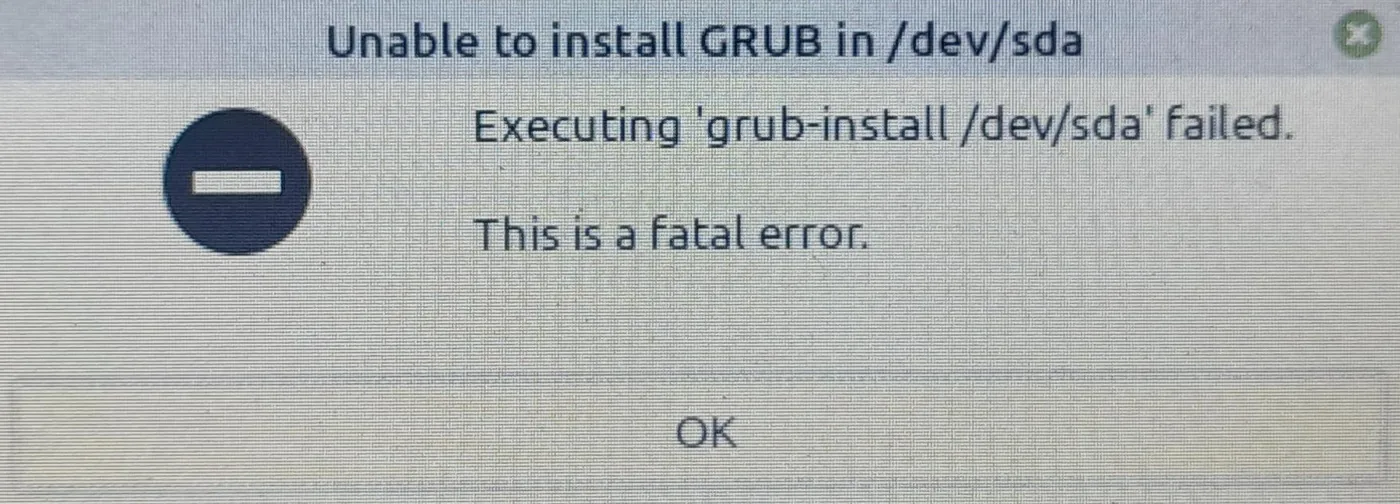
<p>I know that Dynalist is on maintenance mode now. The developers have shifted their focus and put all the resources on Obsidian instead. They have kept Dynalist barely alive with occasional bug fixing at best. But I’m okay with it. As long as Dynalist syncs across my devices and the developers don’t pull the plug on it, I hope to keep using it.</p>]]></content><author><name>Muntasim Ul Haque</name></author><summary type="html"><![CDATA[I had my pretty simple note taking system until I came across this X post by Andrej Karpathy. Karpathy is one of those people on X, whose posts I read religiously for whatever he has to say. In this post he talked about why append-and-review note is his preferred note taking system and more importantly, why it works for him.]]></summary></entry><entry><title type="html">“Unable to install GRUB in /dev/sda” Error During Linux Mint Installation</title><link href="https://muntasimulhaque.github.io/unable-to-install-grub/" rel="alternate" type="text/html" title="“Unable to install GRUB in /dev/sda” Error During Linux Mint Installation" /><published>2025-04-27T00:00:00+06:00</published><updated>2025-04-27T00:00:00+06:00</updated><id>https://muntasimulhaque.github.io/unable-to-install-grub</id><content type="html" xml:base="https://muntasimulhaque.github.io/unable-to-install-grub/"><![CDATA[<p>I was installing Linux Mint 22.1 Xfce on my Thinkpad X220 laptop which already had Windows 10 installed. At the last moment, the installer failed to install GRUB in /dev/sda and showed the <code class="language-plaintext highlighter-rouge">Unable to install GRUB in /dev/sda</code> error with the message <code class="language-plaintext highlighter-rouge">Executing 'grub-install /dev/sda' failed. This is a fatal error.</code></p>

<p><img src="/assets/images/2025-04-27-unable-to-install-grub/grub-error.webp" alt="Unable to install GRUB in /dev/sda" title="Unable to install GRUB in /dev/sda" /></p>

<p>After going through some posts on Linux Mints forum, I found the solution. The issue was with the UEFI and Legacy boot.</p>

<p>My Thinkpad X220 is a pretty old laptop. Interestingly it has both UEFI and Legacy boot options. I faced the issue because my Windows 10 was using the Legacy boot option, while Linux Mint was trying to use the UEFI boot option. They both have to use the same option: either UEFI or Legacy.</p>

<p>The solution was pretty simple. I just had to go to the BIOS by pressing F1 key while booting the laptop. I found 3 options: Both UEFI and Legacy, UEFI only and Legacy only.</p>

<p>As my Windows 10 was using the Legacy option, to prevent Linux Mint from using the UEFI, I chose the Legacy only mode and saved this change by pressing the F10 key.</p>

<p>After a reboot, when I tried to install Linux Mint again, this time the installation completed successfully without showing any error.</p>

<p>This solved the issue for me.</p>]]></content><author><name>Muntasim Ul Haque</name></author><summary type="html"><![CDATA[I was installing Linux Mint 22.1 Xfce on my Thinkpad X220 laptop which already had Windows 10 installed. At the last moment, the installer failed to install GRUB in /dev/sda and showed the Unable to install GRUB in /dev/sda error with the message Executing 'grub-install /dev/sda' failed. This is a fatal error.]]></summary></entry><entry><title type="html">Workaround for Missing in-note Search Feature of Standard Notes for Android</title><link href="https://muntasimulhaque.github.io/standard-notes-search-workaround/" rel="alternate" type="text/html" title="Workaround for Missing in-note Search Feature of Standard Notes for Android" /><published>2025-03-26T00:00:00+06:00</published><updated>2025-03-26T00:00:00+06:00</updated><id>https://muntasimulhaque.github.io/standard-notes-search-workaround</id><content type="html" xml:base="https://muntasimulhaque.github.io/standard-notes-search-workaround/"><![CDATA[<p><a href="https://standardnotes.com/" target="_blank">Standard Notes</a> is a great note taking app. The killer feature for me is its end-to-end encryption feature. Only a couple of note taking apps have end-to-end encryption till date.</p>

<p>I don’t have that much demand from a note taking app. I don’t like the idea of a note-taking app being everything and a kitchen sink. It has to have this no-frills look and be simple enough to quickly jot things down. All I want from what I call a perfect note-taking app is there in Standard Notes, except the in-note search functionality.</p>

<p>They have the global search functionality on Standard Notes, but searching inside individual note is still missing after so many years of its existence. It’s one of the most requested features for Standard Notes. Yet the developers have yet to find a way to implement it. <a href="https://github.com/standardnotes/forum/issues/330#issuecomment-863272902" target="_blank">According to the lead developer Mo</a>:</p>

<blockquote>
  <p>It’s very, very hard. Searching is not the hard part. Showing a yellow rectangle behind instances of a text in a note is hard. It’s hard because we use textarea for the Plain Editor which doesn’t support any custom behavior, and it’s hard because we’d also need to build a custom solution for every other editor in our ecosystem. The Bold Editor would need a different solution from the Plus Editor would need a different solution from the Spreadsheets editor, and so on. Then you need another custom solution for mobile native editors.</p>

  <p>In fact probably the only way to build this in the plain editor, which is the primary use case, would be to ditch textarea for a custom-render editor like CodeMirror, and this is no small feat.</p>

  <p>So no, none of this is easy.</p>
</blockquote>

<p>Luckily, there’s almost always a workaround. Just when I thought of stop using Standard Notes for the alternatives, I found this solution for in-note searchability on Android. I should mention that, the in-note feature is there to some extent for the paid users, but not for the free users. So you gotta find a way.</p>

<p>The workaround is so simple that I felt stupid not to think of it earlier. It’s to open Standard Note from a mobile browser, like Chrome or Firefox, instead of using the app. So when you are using Standard Notes from a mobile browser, you can use that browser’s built-it Find in page or search functionality. It’s almost a perfect solution. You will get the search highlight for individual note in this way though the app itself doesn’t have this feature. Yet.</p>

<p>In-note search is so basic a feature for a note-taking app that, absence of it in Standard Notes made me look for the alternatives. But unfortunately the alternatives didn’t tick all the boxes. Especially when it came to the end-to-end encryption feature.</p>

<p>End-to-end encryption is important for me because sometimes I store passwords and other credentials in the note-taking app. Without the end-to-end encryption, the privacy and security of your notes are left at the mercy of the people behind that note-taking or whichever app you’re using. You need to trust them not to look at your credentials and passwords. You don’t want the safety of your saved passwords dependent on this trust alone.</p>]]></content><author><name>Muntasim Ul Haque</name></author><summary type="html"><![CDATA[Standard Notes is a great note taking app. The killer feature for me is its end-to-end encryption feature. Only a couple of note taking apps have end-to-end encryption till date.]]></summary></entry><entry><title type="html">IELTS Tips from a Band 8 Scorer</title><link href="https://muntasimulhaque.github.io/ielts-tips/" rel="alternate" type="text/html" title="IELTS Tips from a Band 8 Scorer" /><published>2024-12-24T00:00:00+06:00</published><updated>2024-12-24T00:00:00+06:00</updated><id>https://muntasimulhaque.github.io/ielts-tips</id><content type="html" xml:base="https://muntasimulhaque.github.io/ielts-tips/"><![CDATA[<p>Here’s my brief IELTS tips for you.</p>

<ul>
  <li>
    <p>Take a full practice test from the <a href="https://ieltsonlinetests.com/" target="_blank">IELTS Online Tests</a> website within the allocated time. This will give you an idea of where you stand. And knowing your current level is the only purpose of this practice test. Don’t worry if you score low as you don’t know anything (I guess) about the test pattern or the timing yet. IELTS is both a proficiency and a strategy test. You need to understand what the questioner expects from you. Don’t worry though, you’ll learn all this in time.</p>
  </li>
  <li>
    <p>Watch all the videos, except the General Writing playlist, from this <a href="https://www.youtube.com/@IeltsSimon9/playlists" target="_blank">YouTube playlist</a> featuring IELTS Simon. Take notes if you want. I recommend you do. Try to grasp which strategies to use in which situations. After you’re done watching these videos, take another preparation test and compare your result with the earlier test. Rewatch the videos again till you have mastered the strategies.</p>
  </li>
  <li>
    <p>Take timed mock tests from the Cambridge books 11-16 from the <a href="https://banglayielts.com/courses/academic/" target="_blank">Banglay IELTS</a> website. After each test, analyze which parts you’re struggling with. If you find you are lacking, rewatch IELTS Simon’s videos from the playlist.</p>
  </li>
  <li>
    <p>IELTS Simon’s old website had excellent tips. The new website requires subscription. Fortunately, the old website is available on Internet Archive’s Wayback Machine. Check important tips on each page at this archived <a href="https://web.archive.org/web/20230224102046/https://www.ielts-simon.com/ielts-help-and-english-pr/students-questions/" target="_blank">link</a> if you have enough time before the test. These are treasure troves! These are especially useful for quick review before the test.</p>
  </li>
</ul>

<p>Now, here are my tips for each test segment.</p>

<p><strong>Listening</strong>: Read-ahead the next question during the blank-talks or when they give you time to revise the current section. If you miss a question, move on instead of dwelling on it, otherwise you will miss several subsequent questions for this.</p>

<p><strong>Reading</strong>: Don’t read the entire passage at the beginning. Read the title and then go straight to the questions. Look where the first question’s answer lies in the passage. You can skim/scan, though it might not always be an effective strategy. Scanning works well for the names and the years, for others, may not be that useful. Except for matching questions (sentence matching and heading matching), the questions follow sequential order. For example, if you find answers to questions 2 and 4, answer to 3 is sure be found in-between.</p>

<p><strong>Writing</strong>: Follow the suggested structure. You’ll get good ideas of the writing structures by following Simon’s videos.</p>

<p><strong>Speaking</strong>: Don’t use memorized responses. Answer in your own way, in a natural way.</p>

<p>Following these tips religiously and taking lots of mock tests in test environment would help you to score a good result in the final test. Best wishes!</p>]]></content><author><name>Muntasim Ul Haque</name></author><summary type="html"><![CDATA[Here’s my brief IELTS tips for you.]]></summary></entry><entry><title type="html">Design choices I made for my personal website</title><link href="https://muntasimulhaque.github.io/website-design/" rel="alternate" type="text/html" title="Design choices I made for my personal website" /><published>2024-12-16T00:00:00+06:00</published><updated>2024-12-16T00:00:00+06:00</updated><id>https://muntasimulhaque.github.io/website-design</id><content type="html" xml:base="https://muntasimulhaque.github.io/website-design/"><![CDATA[<p>I’ve been thinking about writing, or should I say, documenting the design choices I made to design this personal site of mine.</p>

<p>Of course, no one has persuaded me to write on such a topic. I mean, who on their sane mind would want me to blabber on this topic. Maybe somebody would. Or maybe no one does. It could well be the later, but nonetheless, let this write-up be a documentation for the future me.</p>

<h3 id="which-technologies-im-using">Which technologies I’m using?</h3>

<p>First of all, I’m hosting this site on GitHub Pages, as you can guess from the site domain. I also wrote a <a href="https://muntasimulhaque.github.io/hello-world/" target="_blank">Hello World!</a> blog post on this earlier. Besides the hosting platform, the main deciding technology was Jekyll, a static site generator which is native to GitHub Pages. I also touched on this on that post.</p>

<p>What else?</p>

<p>Well, I wanted to keep things simple. As simple as possible without hurting the user experience. I’ve used the quintessential web technologies like HTML and CSS - the basic ones. Not the offshoots. And I used almost nothing else.</p>

<p>Now, what do I mean by “almost”?</p>

<p>Well, I used just a few lines of JavaScript. And that’s for implementing the navigation menu toggle for the small screens. I wanted to avoid using JS altogether, but turned out you cannot implement the hamburger style toggle menu with using CSS only. I had to use JavaScript, just a little bit, but a little bit nonetheless.</p>

<p><img src="/assets/images/2024-12-16-website-design/menu-toggle.png" alt="Menu Toggle Screenshot" title="Menu Toggle Screenshot" /></p>

<p>It’s not that I hate JS. But I think if you can keep things simple, you should strive to do that irrespective of the human tendency of making things complicated. Now, adding JS might not make things complicated if you can do it properly, some would argue. But it’s my preference to not overuse it and as my design preference of keeping things simple on both front-ends and back-ends.</p>

<p>And I didn’t use any other web technologies. I don’t have usage of database, so I didn’t use it. As I’m using Jekyll though, and it let’s you use Markdown for your pages and posts, I am using that.</p>

<p>I kind of like Markdown for it is a text format. It’s human readable and a great format for keeping things simple and long-lasting.</p>

<h3 id="the-ui">The UI</h3>

<p><img src="/assets/images/2024-12-16-website-design/full-page.png" alt="Full Page Screenshot" title="Full Page Screenshot" /></p>

<p>I wanted to keep the site as simple as possible. And simplicity, as they say, is the end result and not something you get at the outset. I played with lots of “looks” for the site. I tried going with profile picture, a side bar and all that. I even went with a bare minimum CSS to keep the site as minimal and as raw as possible. But neither stayed very long as they weren’t something I wanted the user to experience with.</p>

<p>But this one, the screenshot you’re seeing is what I stayed with. I’m referring to the screenshot as in the future, I might change things up again. But for the time being, this UI design seems perfect to me. To reach this state, I made a total of 807 commits (you’re reading it right) to the GitHub repo as of writing this post. You might think I made a commit after changing an alphabet. Otherwise, why would someone need to make so many deployments to develop such a simple-looking site? Well, you got me. Maybe I’m that noob.</p>

<h3 id="the-color-choice">The color choice</h3>

<p>I settled with the color #333333 as the text color, as the pure black color (#111111) seemed to harsh on the eyes. The default blue color for links also seemed so bright that it seemed to literally look you in the eyes, instead of you looking into it. So instead, I used a softer blue for links, except for the navigation menu items. For navigation menu links, I used a gray-ish color to distinguish it from other links. Though for more accessible design, I could go with underlines for the links instead of relying on the colors alone. But I avoided it to keep the usability intact at the expense of accessibility.</p>

<p>And guess what? You’d see it being used almost everywhere, except for the accessibility related sites. Though I don’t think that justifies me going that route as everyone else does it. But I made that decision thinking of the pros and cons and as the pros weigh more in this case.</p>

<h3 id="the-font-choice">The font choice</h3>

<p>I started with the Georgia font. Then I switched to Georgia for body texts and Verdana for headings. Then I went with Verdana for everything. And now, I’m not using any particular font, rather relying on the system default fonts. I made this choice to give the site a native look on every device it’s viewed on, though I know I lost my control on how the text would look.</p>

<p>The same goes for the font sizes. I toyed with different font sizes and kept some configurations for some time. But at last settled with no defined font size and giving the control to the end-user’s system. This site is currently using the system font sizes. It’s a win-win in that respect that it keeps things simple at my end and give the user control at their end.</p>

<h3 id="the-ux">The UX</h3>

<p>The navigation menu, which let’s you go from page to page, changes color on hover, but the visited pages’ titles don’t change color. Because that would be weird.</p>

<p>The links don’t use underline by default, but on hover they do. It’s to give the reader a visual cue. I settled with it as it seemed a simple and sane default.</p>

<p>The visited links change color to purple as expected. I was thinking of getting rid of it to make things even simpler, but didn’t go that route either. Maybe I will later, but if I do, it would be for the blog post titles only.</p>

<h3 id="keeping-things-simple">Keeping things simple</h3>

<p>I started with controlling the UI and UX aspects of the site as much as possible. That needed me to exercise that much control through code and as a result made things kinda complicated for me. Because, well, there are different screen sizes and to make the site look good at every device, you need to control every aspect of the site.</p>

<p>I was happy that way because I could give the user the look and feel the way I wanted them to have. But then again, modern browsers have sane defaults now and trying to control everything would just make things more complicated at my end. Simplicity was my goal from day one. And I know what I want and what I don’t.</p>

<p>I want to give the reader a site that is simple, minimal and make them feel welcome.</p>

<p>You can experience that from the color I used and the overall design choices I made. I didn’t want the site to be slow and look bad on the eye. That’s why I didn’t use any web fonts, or third party JS library, or even analytics.</p>

<p>So, there you have it. The post I wanted to write to document the design choices I made for this site. It’s not comprehensive, nor it is complete. I know tings will change it the future as I learn more and think better. At least, I think I could touch on the topics I wanted to cover that played important role for the site.</p>]]></content><author><name>Muntasim Ul Haque</name></author><summary type="html"><![CDATA[I’ve been thinking about writing, or should I say, documenting the design choices I made to design this personal site of mine.]]></summary></entry><entry><title type="html">Hello World!</title><link href="https://muntasimulhaque.github.io/hello-world/" rel="alternate" type="text/html" title="Hello World!" /><published>2024-10-26T00:00:00+06:00</published><updated>2024-10-26T00:00:00+06:00</updated><id>https://muntasimulhaque.github.io/hello-world</id><content type="html" xml:base="https://muntasimulhaque.github.io/hello-world/"><![CDATA[<p>Hello World!</p>

<p>This is my first blog post here, on <a href="https://pages.github.com/" target="_blank">GitHub Pages</a> using <a href="https://jekyllrb.com/" target="_blank">Jekyll</a> under the hood. I’ve blogged on different platforms before e.g. Blogspot, Wordpress, Tumblr, Medium, etc. So, what’s different this time?</p>

<p>Well, this time I’m posting on a static site.</p>

<h3 id="whats-the-advantage-of-using-a-static-site">What’s the advantage of using a static site?</h3>

<p>Nothing. I mean, I didn’t choose to blog here just because it gave me a leverage over other platforms. It’s just that, using Jekyll makes the experience a bit simpler to blog on GitHub Pages.</p>

<h3 id="why-blog-on-github-pages">Why blog on GitHub Pages?</h3>

<p>I didn’t specifically choose to blog here. I intended this site to serve as my academic portfolio.</p>

<p>To develop this site, I tried other GitHub Pages sites and forked the ones I liked. Among them, <a href="https://academicpages.github.io/" target="_blank">Academic Pages</a> stood out to me. It’s actually a good starting point for someone who needs to create an academic site without much knowledge of behind the scenes. In fact, I forked Academic Pages earlier. But as I delved deeper, I realized it’s overkill for my use case.</p>

<p>I wanted a simple site that looks and acts as I wanted. Academic Pages is great in that respect, but for me, I had to change a lot of its codes to make it my own.</p>

<p>So, at one point, I abandoned it and started from scratch. And this is the end-product that you’re seeing. But of course, I believe improvement is a never-ending game. So this site will likely change in the future.</p>

<p>Coming back to the point, blogging here wasn’t something I set out to do at the outset. While searching for the perfect site, I saw some people blogging using Jekyll on GitHub Pages. So I thought why not try it?</p>

<p>I am a believer of sharing knowledge with others. I’ve shared my knowledge with others before, I am sharing now and I will continue to share in the days to come.</p>

<h3 id="whats-next">What’s next?</h3>

<p>This site will act mainly as my academic portfolio. I don’t have any master-plan of doing anything big here.</p>

<p>Talking about blogging, I’ll occasionally share my knowledge, ideas and thoughts. I don’t have any plan of implementing social share button, or commenting. But I can’t talk about the future. The future will decide for itself.</p>

<p>Enough talk for now, go and have a great life!</p>]]></content><author><name>Muntasim Ul Haque</name></author><summary type="html"><![CDATA[Hello World!]]></summary></entry></feed>